

Mercedes-Benz CLA, C-Class, E-Class, GLA, GLC, GLE, GLS, GLB, CLS, A-Class, and B-Class models (2020–2024) – How to Turn Off / Disable Locking Sound
Here is a video on how to Turn Off or Disable Locking Sound when you are using the key on Mercedes-Benz CLA, C-Class, E-Class, GLA, GLC, GLE, GLS, GLB, CLS, A-Class, and B-Class models (2020–2024) in 3 easy steps.
I encourage you to also look at these THOUSANDS OF PRODUCTS at promotional prices for: https://amzn.to/4yrWmlY
See what Accessories you can find HERE for Mercedes-Benz at the BEST PRICE: https://s.click.aliexpress.com/e/_dZ4IUHR
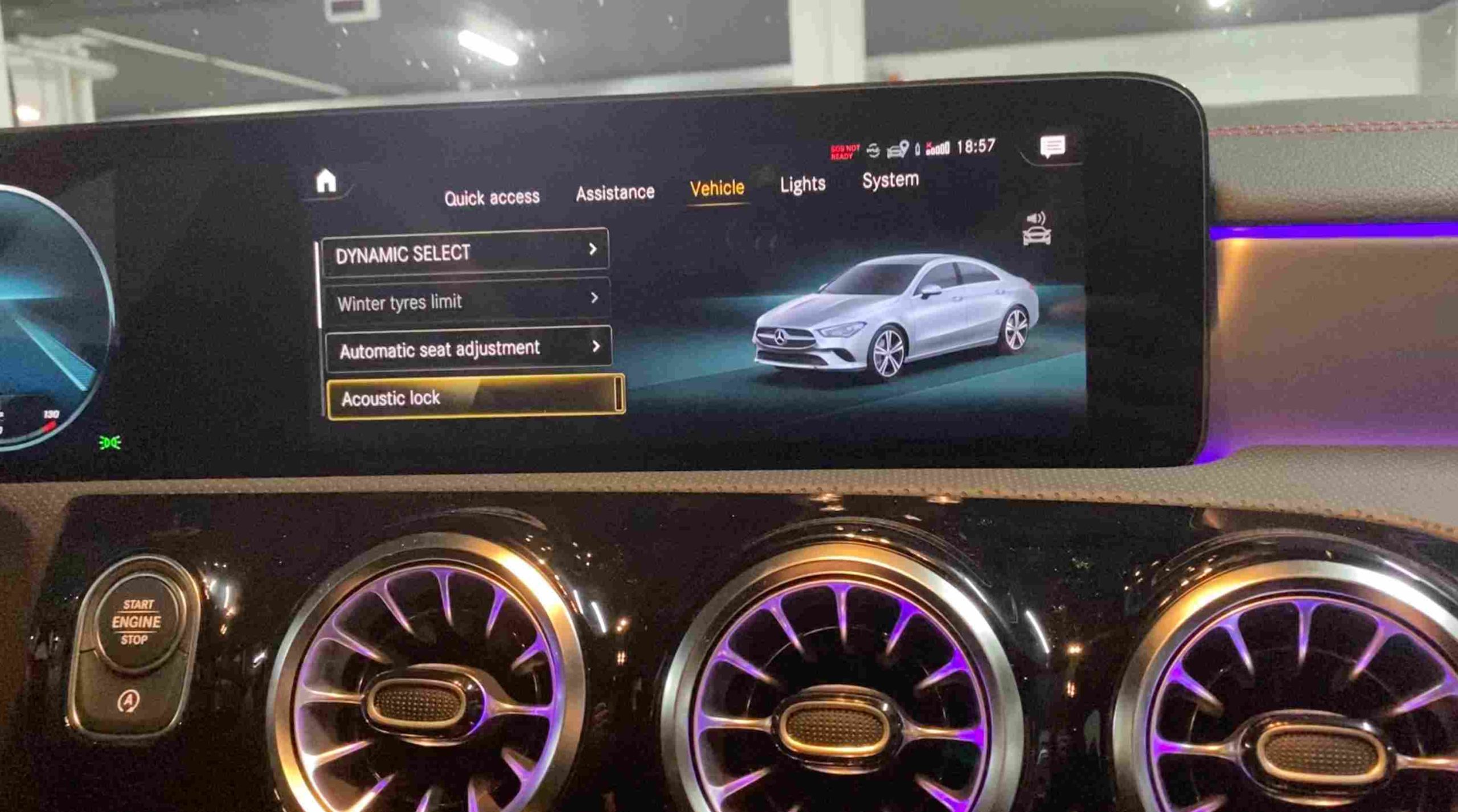
In this tutorial, we explain how to disable the audible locking signal without modifying the electrical wiring or interfering with the central locking system.
What is the audible locking signal on Mercedes-Benz models?
When you press the lock button on your Mercedes-Benz key, the car may emit a sound to confirm that the doors have locked.
While this feature is useful for confirming the vehicle is locked, it can become bothersome—especially when locking the car in a parking lot, a residential area, or at night.
On certain Mercedes-Benz configurations, the confirmation sound can be modified or deactivated through the vehicle’s menu.
How to disable the door-locking sound
To check if this function can be deactivated on your Mercedes-Benz CLA, C-Class, E-Class, GLA, GLC, GLE, GLS, GLB, CLS, A-Class, or B-Class (2020–2024), turn on the multimedia system and access the vehicle’s configuration menu. Menu names may vary depending on the vehicle’s equipment and software version.
Follow these steps:
1. Turn on the ignition (do not start the engine) and locate „Settings” on the central display.
2. Go to „Vehicle” and select „Acoustic lock.”
3. Disable the acoustic confirmation for door locking by pressing the button again.
If the option is available, disable the acoustic confirmation for door locking.
After changing the setting, lock the vehicle using the key and verify that the audible signal has been disabled.
If you cannot find the option in the menu
Not all Mercedes-Benz vehicles have the exact same functions available in the multimedia system.
Vehicle equipment, the market for which the car was manufactured, and the software version can influence the available settings.
If the option to disable the acoustic alert does not appear in the vehicle’s menu, the function may require electronic coding using Mercedes-Benz-compatible diagnostic equipment.
It is recommended that this modification be performed by someone familiar with Mercedes-Benz electronic systems and module coding.
Can the sound be completely disabled?
It depends on the vehicle’s configuration.
It is important to distinguish between the locking confirmation sound and other vehicle audible alerts. Disabling the acoustic confirmation should not affect critical safety functions or fault warnings.
After making the change, always verify that the vehicle locks correctly and that all other alerts are functioning normally. If you want to disable the audible alert when locking your Mercedes-Benz CLA, C-Class, E-Class, GLA, GLC, GLE, GLS, GLB, CLS, A-Class, or B-Class (2020–2024) using the key, the first step is to check the vehicle’s settings menu.
If the option is not available, disabling the feature may require coding using a diagnostic tool.
The procedure may vary depending on the vehicle’s equipment and software version; therefore, it is recommended to verify the specific vehicle configuration before altering electronic settings.
If you have any suggestions about new tutorials, let us know in the comments section!
If you enjoyed this video tutorial, make sure to give it a thumbs up and share it with your friends.
Also, don’t forget to LIKE and SUBSCRIBE!
In this post you will find affiliate links, meaning if you click through an affiliate link and make a purchase, I could make a commission. Thank you!
Check these VIDEO TUTORIALS for Mercedes-Benz:
How to change display language from instrument cluster on Mercedes-Benz A-Class, C-Class!
How to replace Mercedes-Benz key fob battery in 4 steps!
How to reset service light (oil service) on Mercedes-Benz CLS in 6 steps!